

How to backup Postgres data to S3 Bucket using Minio

Managing a database on your own can be problematic. As someone who is not that into DevOps, setting up a database and managing it is a difficult task. I have currently hosted two of my side projects - Cartella and Compito in a barebones Ubuntu VPS.
Self-hosted vs Managed DB
There can be a lot of problems when you are new to this whole deployment scene. I recently faced an issue with Cartella, where all the data was lost somehow. I hosted a Postgres database in a docker container which was used by the node application running in another docker container.
One day, I realized I was not able to log in to Cartella, I checked the PM2 dashboard to see if the server is running fine or not. The API which is a node application was running fine. So next I checked the DB, and to my surprise, there was no data.
With managed DB services, we don't have to worry about anything. Everything is already taken care of for us, backups in time, restoration, guaranteed uptime, etc. The only downside is that it can be expensive. For instance, DO provides managed Postgres DB for $15/month while you can self host a Postgres DB in one of their droplets for $5/month.
The need for backup
That day I realized how important it is to have backups. Even if you don't have all the data, there is at least some data which is much better If you ask me. The application was just running as a demo and so I didn't bother much to set up backups and DB properly.
I didn't bother much as I was experimenting with deployments and stuff. Backing up of data is still important though. So once I get hold of how to deploy DB and set up connections, it's finally time to learn how to backup data.
How to create local Postgres backups
There are quite a few ways to create Postgres backups. Out of them, one of the most common methods that I could find is using pg_dump.
pg_dump is a small utility for backing up Postgres databases. It can be used to back up a single DB at a time. What the utility does is that it creates an SQL query with the data in the database. So if we want to restore the backup, we could simply run the query.
pg_dump -U <DB_USER> <DB_NAME> -h <DB_HOST> -p <DB_PORT> > backup.sql
Replace the arguments like below. You can omit the host and port if its the default(localhost:5432)
pg_dump -U postgres mydb > backup.sql
Now that we have the backup ready, It's safe to upload it elsewhere so that we don't lose the backup in case something goes wrong with our server.
Save the Postgres credentials
We need to save the Postgres DB credentials locally so that we can use pg_dump without having to enter the credentials.
- Create a file named
.pgpassin the root folder of the user( Eg:/home/ubuntu/) - Use an editor and add the following data (replace with your credentials) in the file
hostname:port:database:username:password - Save the file and update the file permissions :
chmod 600 .pgpass
Uploading the backup file to Cloud Storage
I'm gonna be using Object storage from Oracle Cloud (Similar to AWS S3). Oracle cloud object storage has S3 compatibility and so we can easily use any S3 compatible client to access it. For interacting with our bucket, we can use the Min.io client. Min.io client provides us with a CLI that can be used to do all kinds of operations in our object storage.
- Install the Min.io Client:
Check the official docs for other OS: https://min.io/downloadwget https://dl.min.io/client/mc/release/linux-amd64/mcli_20210902092127.0.0_amd64.deb dpkg -i mcli_20210902092127.0.0_amd64.deb - Verify the installation:
mcli version - Connect to the storage
mcli alias set <ALIAS> <YOUR-S3-ENDPOINT> <YOUR-ACCESS-KEY> <YOUR-SECRET-KEY> - Verify the connection by running the command to list the available buckets
This should list all the buckets in the storage.mcli ls <ALIAS>
Ref: Minio Client Docs
Creating the backup script
We'll create a script that can create the backup and upload the same to the object storage. A very small bash script can do this:
#!/bin/bash

# Constants
USER="postgres"
DATABASE="compito"
HOST="localhost"
BACKUP_DIRECTORY="/home/ubuntu/backups"

# Date stamp (formated YYYYMMDD)
CURRENT_DATE=$(date "+%Y%m%d")

# Create the backup and then zip it
pg_dump -U $USER $DATABASE -h $HOST | gzip - > $BACKUP_DIRECTORY/$DATABASE\_$CURRENT_DATE.sql.gz

# Upload to cloud
mcli cp $BACKUP_DIRECTORY/$DATABASE\_$CURRENT_DATE.sql.gz oracle/compito-backup
You can save the code as a bash file --> backup.sh
What the script does is self-explanatory.
- Setup the constants like the user name, database name, etc
- Get the current time so that we can use it for tagging the backup files.
- Create the backup using the
pg_dumpcommand and usegzipto compress it. - Use the minio CLI to copy the file to the cloud bucket
mcli cp <FILE> <BUCKET>/<FOLDER>
Setup a CRON job to automate the backup process
It's very easy to set up a cronjob. Follow the steps and create a cronjob for our backup script.
Use any crontab string generator to create the desired frequency of the job. I plan on backing up the DB daily. Here's how the cron schedule expression looks like:
0 0 * * *
It runs the script daily at 12.00 AM.
In Linux, the cron daemon is inbuilt and looks at the Cron Tables for the scheduled jobs. We need to add a new entry in the crontab like so:
- In the terminal, run the below command to edit the cron-table:
crontab -e - Append the line at the end and save.
0 0 * * * /home/ubuntu/backup.sh
You are all set now! You can sit back and relax now.
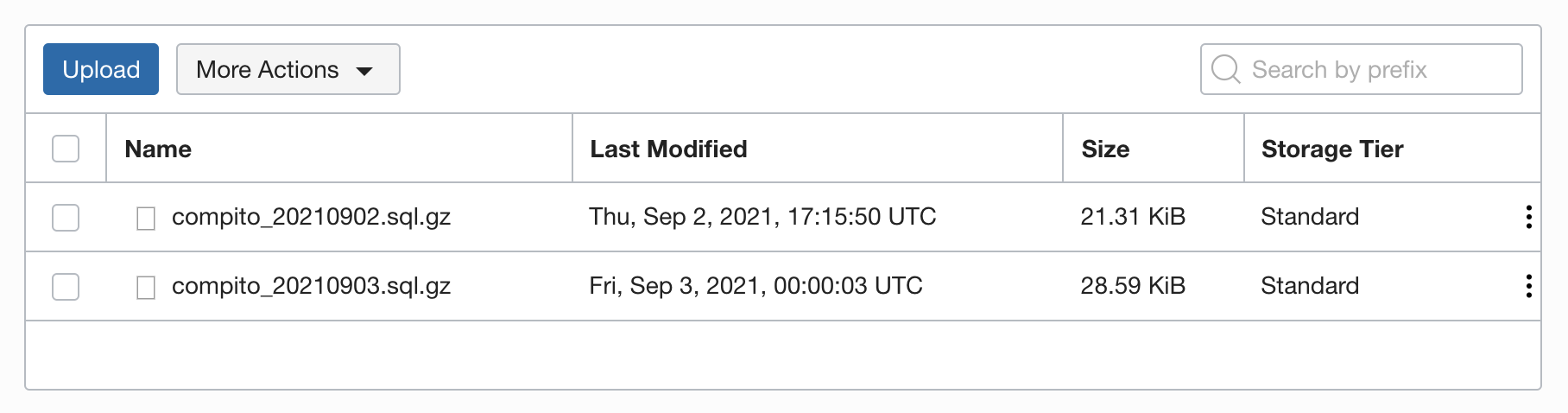 If you go to the object storage and check the folder, you'll be able to see the backups saved.
Note: This script is just a starter and intended to be used with demo or side projects. In a production setup, you would have to consider a lot more stuff like error handling, backup rotation, and more. Thanks to Andreas for bringing this up.
Connect with me

Do add your thoughts in the comments section. Stay Safe ❤️
About the author
Full stack web developer with main focus in Angular and NodeJs. Loves creating blogs, a side projects when I can find time.
Comments
Join the discussionNo comments yet. Be the first to comment.


